
InfoComm 2027 / Orlando
InfoComm exhibits designed so the technology can be seen, heard and understood.
Innovexhibit plans InfoComm booths around visible AV demonstrations, software displays, connected experiences, branded graphics and the show-site details required in a busy hall.
About InfoComm
Start InfoComm booth planning with current event and venue facts.
InfoComm brings professional AV and integrated-experience technology to Orlando in 2027. A credible booth does more than display equipment: it creates a legible demonstration sequence, helps visitors understand the application and gives technical teams a functional place to talk.
FormatBusiness-to-business trade event
Primary audienceAV integrators, consultants, end users, technology partners, designers and technical decision-makers.
OrganizerAVIXA
Booth objectiveMake the product story, demonstration and next conversation easier to begin.
InfoComm booth design priorities
Plan an InfoComm booth around AV demonstrations and technical buyer needs.
The right solution is not a copied layout. It is a practical arrangement of the product, the visitor route, the staff role and the show-floor details that have to work at the same time.
01
Demonstration legibility
Give each screen, sound, control or collaboration demo a clear purpose and sightline.
02
Technical workflow
Plan cable paths, equipment locations, power, content playback and staff operation before the exhibit takes shape.
03
Conversation zones
Separate live demos from technical meetings so visitors can hear the right message and specialists can talk productively.
InfoComm booth sizes and demo layouts
Choose an InfoComm booth size around AV equipment, demos and technical meetings.
A compact inline booth, an interactive demo environment and a larger meeting-led exhibit solve different problems. Use the trade show booth size guide to compare footprints, then scope the layout around the visitor experience rather than square footage alone.
01
Focused technology demo
A compact booth for one AV solution, a controlled presentation screen and qualified visitor conversations.
->
02
Integrated solution
A multi-zone layout that shows connected systems, demonstration moments and technical discussion areas.
->
03
Experience environment
A larger format for immersive demonstrations, partner technology, staging and scheduled buyer or integrator meetings.
->
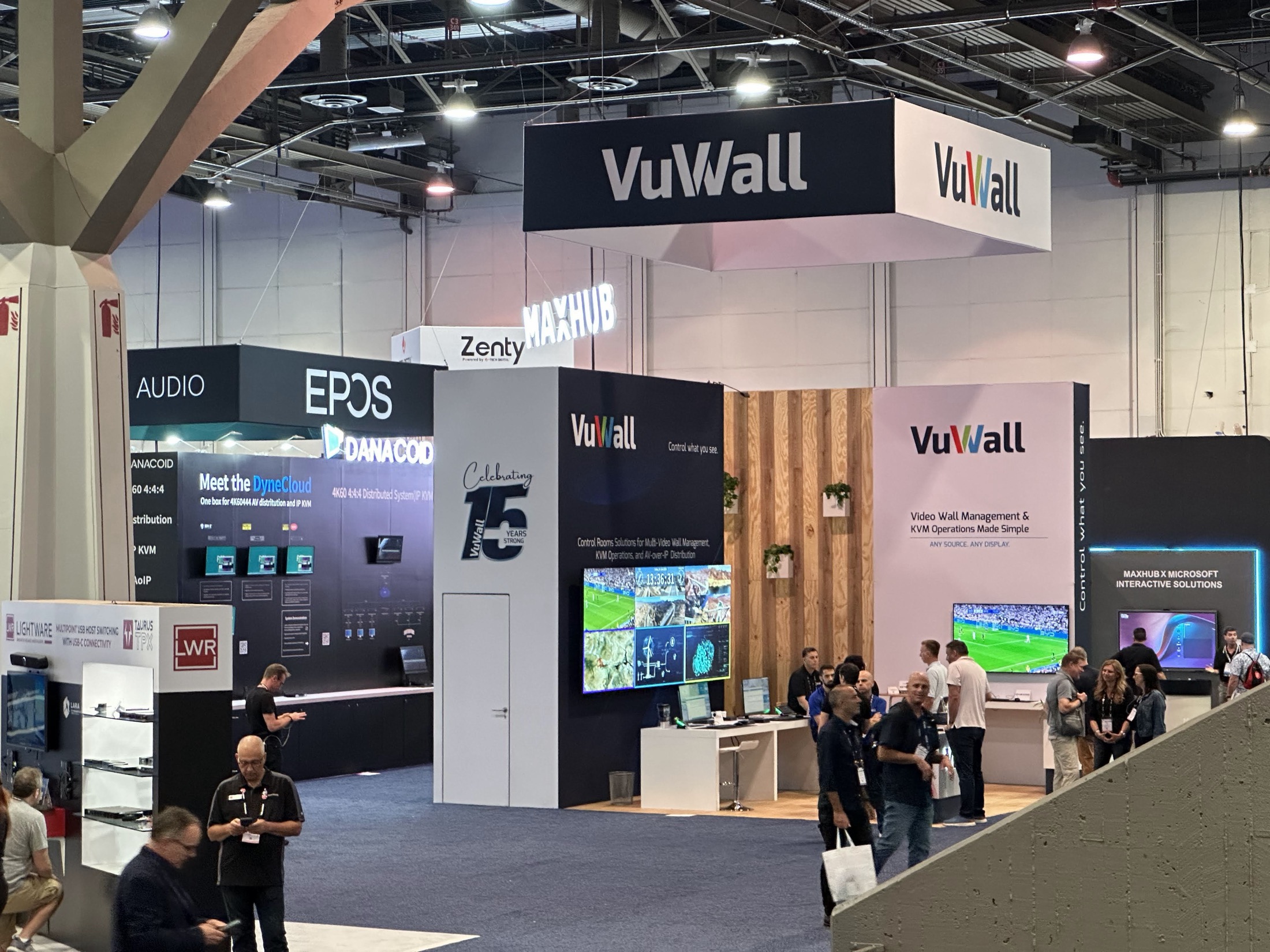
Innovexhibit InfoComm exhibit work / 2024
The AV demonstration has to read from the aisle and work up close.
This InfoComm project shows the relationship between a visible video-wall signal, product messaging and the equipment access needed to operate a technical demonstration. The booth is structured around the technology rather than treating the screen as an afterthought.
Project contextInfoComm / Orlando
Planning focusVideo-wall visibility and AV operation
Execution cueTechnical display, equipment access and staff flow
InfoComm exhibit planning notes
Connect InfoComm AV demos, graphics, equipment access and show-site services.
The official event information is part of the project brief, not an afterthought. It helps keep the concept, venue services, production and show-site execution moving in the same direction.
Design the demo before the architecture
Write the visitor sequence: what is seen first, what is experienced next and where the team explains the technical value.
Reserve room for equipment and service
AV installations need purposeful locations for hardware, cable management, control and staff access.
Confirm services through official channels
Power, rigging, internet, labor and operating details must follow the current InfoComm and venue requirements.
InfoComm booth design and build sequence
Lock AV equipment, demo content and service inputs before InfoComm production deadlines tighten.
The strongest outcomes come from deciding the product story, visitor flow, graphics, fabrication and event logistics as one working scope.
01 / Define
Define the InfoComm Booth Objective.
Share the InfoComm footprint, AV products, demonstration sequence, technology audience, timeline, budget and the technical conversation visitors should begin.
02 / Plan
Plan the InfoComm AV Demonstration Experience.
Map AV viewing lines, sound control, hands-on demonstrations, technical meetings and equipment storage around the assigned floor conditions.
03 / Coordinate
Coordinate InfoComm Design, Fabrication and Services.
Align exhibit structure, AV equipment access, graphics, production, current services and logistics before fabrication begins.
04 / Open
Prepare the InfoComm Booth for Move-In.
Install the InfoComm booth, test visitor-facing demo positions and graphics, then coordinate dismantle and move-out.
InfoComm planning questions
InfoComm booth design and planning questions.
Bring the facts you have. We will help turn the event, footprint, products and show goals into a practical exhibit direction.
How should an InfoComm demo booth be planned?
Begin with the actual demonstration flow, not the booth shape. Screen placement, sound, interaction distance, staff position and technical access should inform the final footprint.
Can a rental booth support AV equipment?
Yes. A rental structure can support screens, lightboxes, product displays and branded graphics when the technical load, mounting, power and access are planned in advance.
What should our InfoComm brief include?
Share the booth size, equipment list, demo sequence, screen and AV requirements, power or network needs, staff count, meeting needs, dates and budget.
Plan your InfoComm booth
Plan your InfoComm booth with Innovexhibit.
Share the footprint, equipment, software displays, connected experiences, demo sequence, screen content, power or network inputs, timing and official InfoComm requirements. From our Las Vegas production base, we will compare a rental booth, custom exhibit, graphics package and InfoComm show-site installation planning. For related technology-demo proof, review the 10×20 70mai project; it is a SEMA project, not a claim of InfoComm work.
Get Your Free Las Vegas Booth Proposal
Tell us about your upcoming trade show and our experts will prepare a customized booth solution for you.
Your inquiry goes directly to the Innovexhibit booth team and is saved for follow-up.